
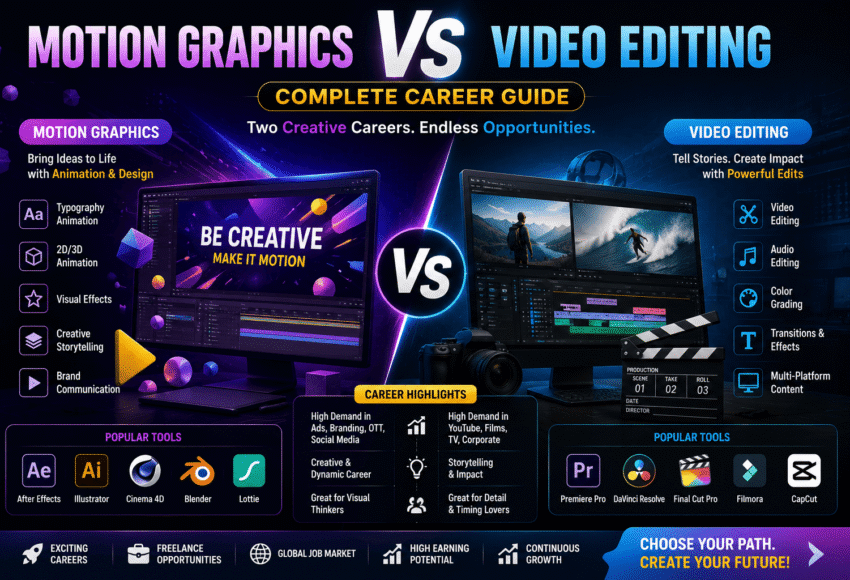
Motion Graphics vs Video Editing: Complete Career Guide (2026)
The demand for digital content has never been higher. From YouTube videos and social media advertisements to OTT platforms, corporate films, and animated explainers, businesses require skilled creative professionals to produce engaging visual content. Two of the most popular career choices in this field are Motion Graphics and Video Editing.
Although these careers often work together, they require different creative approaches and technical skills. Motion Graphics focuses on creating animated visual elements, while Video Editing involves assembling and enhancing recorded footage into compelling stories.
If you’re wondering which course offers better career opportunities, salary, and future growth, this complete guide compares Motion Graphics and Video Editing to help you choose the right creative path in 2026.
What is Motion Graphics?
Motion Graphics is the art of bringing graphic design elements to life through animation. It combines typography, illustrations, icons, shapes, transitions, and visual effects to create engaging digital content.
Motion Graphics are widely used in:
- Social Media Advertisements
- YouTube Intro Videos
- Brand Promotions
- Explainer Videos
- Television Commercials
- Product Demonstrations
- Corporate Presentations
- Mobile Applications
- Websites
- Broadcast Graphics
Motion Graphics Designers create visually appealing animations that communicate messages quickly and effectively.
What is Video Editing?
Video Editing is the process of selecting, arranging, trimming, and enhancing video footage to tell a compelling story. Editors combine visuals, audio, music, transitions, effects, subtitles, and colour grading to produce professional-quality videos.
Video Editing is used for:
- YouTube Videos
- Instagram Reels
- Wedding Films
- Corporate Videos
- Educational Content
- News Production
- Podcasts
- Documentary Films
- Advertisements
- OTT Content
Video editors transform raw footage into polished visual experiences.
Motion Graphics vs Video Editing: Quick Comparison
| Feature | Motion Graphics | Video Editing |
|---|---|---|
| Primary Focus | Animated Visual Design | Editing Recorded Footage |
| Creativity | Very High | High |
| Storytelling | Moderate | Very High |
| Drawing Skills | Helpful | Not Required |
| Animation Skills | Essential | Basic Knowledge Helpful |
| Software | After Effects, Cinema 4D, Blender | Premiere Pro, DaVinci Resolve, Final Cut Pro |
| Learning Curve | Moderate to Advanced | Beginner to Intermediate |
| Freelancing | Excellent | Excellent |
| Remote Jobs | High | High |
Skills Required for Motion Graphics
A professional Motion Graphics course teaches:
- Typography Animation
- Kinetic Typography
- Logo Animation
- Motion Design Principles
- Storyboarding
- Visual Composition
- Colour Theory
- 2D Animation
- Motion Tracking
- Basic 3D Animation
- Creative Thinking
- Branding Concepts
These skills are highly valuable for advertising, digital marketing, and entertainment industries.
Skills Required for Video Editing
Video Editing courses focus on:
- Storytelling
- Timeline Management
- Video Sequencing
- Audio Editing
- Colour Correction
- Colour Grading
- Transitions
- Subtitle Creation
- Sound Design
- Multi-Camera Editing
- Export Optimisation
- Content Repurposing
Editors learn how to create engaging narratives through pacing and visual flow.
Software Used in Motion Graphics
Industry professionals commonly use:
- Adobe After Effects
- Cinema 4D
- Blender
- Adobe Illustrator
- Adobe Photoshop
- Adobe Animate
- Cavalry
- Unreal Engine (for advanced workflows)
AI-assisted animation features are increasingly helping designers automate repetitive tasks and speed up production.
Software Used in Video Editing
Professional video editors commonly work with:
- Adobe Premiere Pro
- DaVinci Resolve
- Final Cut Pro
- Adobe Audition
- After Effects (for advanced editing)
- CapCut
- Filmora
- Media Encoder
AI-powered features such as auto-captioning, object removal, speech enhancement, and scene detection are becoming standard in modern editing software.
Career Opportunities in Motion Graphics
Motion Graphics professionals can work as:
- Motion Graphics Designer
- Motion Designer
- Broadcast Designer
- Advertisement Designer
- Brand Animator
- Explainer Video Designer
- Creative Designer
- Digital Content Designer
- Multimedia Artist
- Animation Designer
Industries hiring Motion Graphics professionals include:
- Advertising Agencies
- Digital Marketing Companies
- Television Networks
- OTT Platforms
- Media Houses
- Corporate Organisations
- E-learning Companies
- Creative Studios
Career Opportunities in Video Editing
Video Editors can pursue careers as:
- Video Editor
- Social Media Video Editor
- YouTube Video Editor
- Corporate Video Editor
- Wedding Film Editor
- Advertisement Editor
- Documentary Editor
- Broadcast Editor
- Content Creator
- Podcast Video Editor
Industries include:
- Production Houses
- News Channels
- Digital Agencies
- Marketing Companies
- E-commerce Businesses
- Educational Platforms
- Influencer Agencies
- Media Organisations
Salary Comparison
Salaries vary depending on skills, experience, portfolio, industry, and location.
Motion Graphics Designer Salary
Freshers:
- ₹3.5–6 LPA
Experienced Professionals:
- ₹7–15+ LPA
Specialists in advertising, branding, and advanced animation often earn higher salaries.
Video Editor Salary
Freshers:
- ₹2.5–5.5 LPA
Experienced Professionals:
- ₹6–12+ LPA
Editors working with premium brands, production houses, or international clients can earn significantly more.
Future Scope of Motion Graphics
The demand for Motion Graphics continues to grow due to:
- Digital Advertising
- Social Media Marketing
- Brand Storytelling
- Product Explainer Videos
- OTT Platforms
- Corporate Training Videos
- UI Animations
- Interactive Content
Businesses increasingly use motion design to improve engagement and communication.
Future Scope of Video Editing
Video Editing remains one of the fastest-growing creative careers because of:
- YouTube Creator Economy
- Instagram Reels
- Short-Form Video Content
- Corporate Marketing
- Online Education
- Digital Advertising
- Live Streaming
- Podcast Production
Almost every industry now relies on video content, creating consistent demand for skilled editors.
Motion Graphics vs Video Editing: Which Should You Choose?
Choose Motion Graphics if you enjoy:
- Animation
- Graphic Design
- Visual Creativity
- Branding
- Typography
- Motion Design
- Advertising
- Creative Experimentation
Choose Video Editing if you enjoy:
- Storytelling
- Film Production
- Content Creation
- Music Videos
- Documentary Films
- Corporate Videos
- Social Media Content
- Fast-Paced Creative Work
Can You Learn Both?
Yes.
Many creative professionals combine Motion Graphics and Video Editing to produce complete multimedia projects. Motion Graphics can enhance edited videos with animated titles, transitions, visual effects, and brand elements, making this combination highly valuable for employers and freelance clients.
Learning both skills increases versatility and opens opportunities in advertising, digital marketing, media production, and entertainment.
Why Choose a Professional Training Institute?
A comprehensive Motion Graphics and Video Editing course should provide:
- Industry-Relevant Curriculum
- Hands-On Projects
- Portfolio Development
- Latest Software Training
- AI-Assisted Creative Workflows
- Expert Mentorship
- Internship Opportunities
- Placement Assistance
- Soft Skills Development
- Career Guidance
Practical experience and a professional portfolio are essential for building a successful creative career.
Frequently Asked Questions (FAQs)
1. Which is better: Motion Graphics or Video Editing?
Both are excellent career options. Motion Graphics is ideal for those who enjoy animation and visual design, while Video Editing is suited to individuals who enjoy storytelling and working with recorded footage.
2. Does Motion Graphics pay more than Video Editing?
Motion Graphics specialists often earn higher salaries due to advanced animation skills. However, experienced Video Editors working with premium brands, production houses, or international clients can also achieve excellent earnings.
3. Can a Video Editor learn Motion Graphics?
Yes. Many Video Editors expand their skills by learning Adobe After Effects and motion design, enabling them to create more engaging and visually dynamic content.
4. Which software should beginners learn first?
For Video Editing, Adobe Premiere Pro or DaVinci Resolve are excellent starting points. For Motion Graphics, Adobe After Effects is the most widely used software.
5. Is Motion Graphics difficult to learn?
Motion Graphics has a steeper learning curve than basic video editing because it involves animation principles, timing, typography, and visual composition. Regular practice helps build proficiency.
6. Can I freelance in both fields?
Yes. Motion Graphics Designers and Video Editors are in demand among agencies, startups, content creators, production houses, and international clients.
7. Is AI replacing Motion Graphics Designers and Video Editors?
AI is automating repetitive production tasks and speeding up workflows, but creativity, storytelling, branding, and artistic decision-making remain essential. Professionals who learn to use AI effectively can improve productivity and stay competitive.
8. Which career has better future demand?
Both careers are expected to remain in demand. Motion Graphics is growing rapidly in advertising and branding, while Video Editing continues to expand due to the creator economy and increasing demand for digital video content.
9. Can I learn Motion Graphics and Video Editing together?
Yes. Combining both disciplines makes you a more versatile multimedia professional and improves career opportunities across multiple industries.
10. Which course is best after the 12th?
The best course depends on your interests. If you enjoy animation and design, Motion Graphics is an excellent choice. If you enjoy storytelling and editing footage, Video Editing may be the better option.
Conclusion
Both Motion Graphics and Video Editing offer exciting, future-ready careers in the rapidly growing digital media industry. Motion Graphics is ideal for creative individuals passionate about animation, branding, and visual storytelling, while Video Editing is perfect for those who enjoy crafting compelling narratives through film and digital content.
Rather than choosing one over the other, many successful professionals combine both skill sets to deliver complete multimedia solutions. By learning industry-standard software, embracing AI-powered creative tools, building a strong portfolio, and gaining practical experience, you can establish a rewarding career in advertising, entertainment, digital marketing, media production, or content creation.


Leave a Comment