
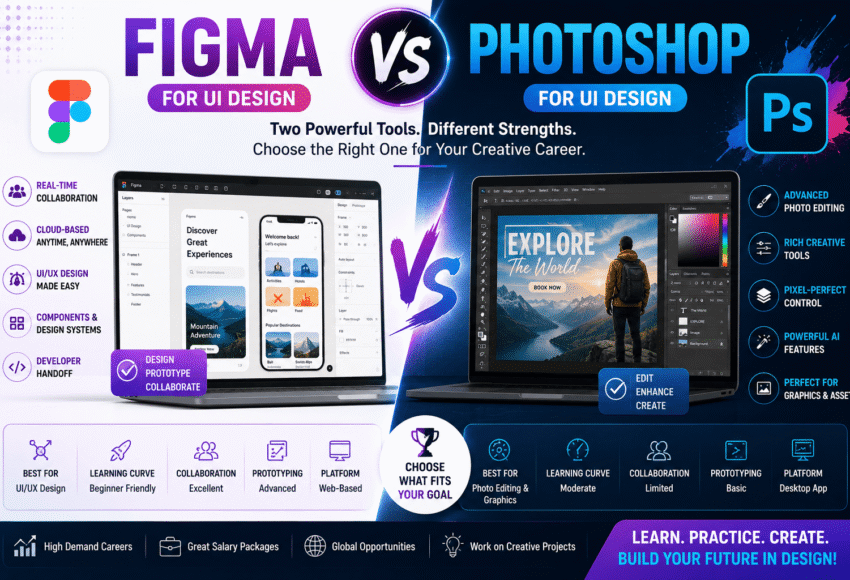
Figma vs Photoshop for UI Design: Which Tool Should You Learn in 2026?
The demand for UI/UX Designers continues to grow as businesses invest in websites, mobile applications, SaaS platforms, and digital products. One of the most common questions beginners ask is:
Should I learn Figma or Photoshop for UI Design?
While both tools are powerful, they serve different purposes. Figma is built specifically for interface design, prototyping, and team collaboration, whereas Adobe Photoshop excels in photo editing, digital artwork, image manipulation, and graphic design.
In this comprehensive guide, we’ll compare Figma vs Photoshop based on features, ease of learning, collaboration, UI design capabilities, career opportunities, salaries, and future industry trends to help you choose the right design tool.
What is Figma?
Figma is a cloud-based UI/UX design and prototyping tool used for designing websites, mobile applications, dashboards, software interfaces, and digital products.
Its real-time collaboration features make it one of the most widely used tools among product designers and development teams.
Figma is commonly used for:
- UI Design
- UX Design
- Wireframing
- Interactive Prototypes
- Design Systems
- Mobile App Design
- Website Design
- User Flows
- Team Collaboration
- Developer Handoff
Today, Figma is considered an industry standard for UI/UX design.
What is Adobe Photoshop?
Adobe Photoshop is a professional image editing and graphic design software used for creating digital artwork, editing photographs, designing marketing materials, and producing creative visual assets.
Photoshop is ideal for:
- Photo Editing
- Image Retouching
- Digital Painting
- Banner Design
- Social Media Creatives
- Logo Mockups
- Image Manipulation
- Web Graphics
- Poster Design
- Marketing Materials
Although Photoshop can be used for UI design, it was not specifically built for designing modern digital interfaces.
Figma vs Photoshop: Quick Comparison
| Feature | Figma | Photoshop |
|---|---|---|
| Primary Purpose | UI/UX Design | Image Editing & Graphic Design |
| Collaboration | Real-Time | Limited |
| Cloud-Based | Yes | Optional (Cloud Sync Available) |
| UI Prototyping | Excellent | Basic |
| Design Systems | Excellent | Limited |
| Responsive Design | Easy | Manual |
| Developer Handoff | Excellent | Limited |
| Learning Curve | Beginner-Friendly | Moderate |
| Best For | UI/UX Designers | Graphic Designers & Photo Editors |
Why Figma is Popular for UI Design
Figma is designed specifically for digital product design and offers features that simplify the UI/UX workflow.
Key advantages include:
- Real-Time Team Collaboration
- Cloud-Based Access
- Interactive Prototyping
- Auto Layout
- Design Systems
- Reusable Components
- Version History
- Responsive Design
- Developer Inspection
- Easy File Sharing
These features make collaboration between designers, developers, and product managers much smoother.
Why Photoshop is Still Important
Photoshop remains one of the most powerful creative applications for image-based work.
It is widely used for:
- Photo Editing
- Image Enhancement
- Social Media Graphics
- Digital Illustrations
- Creative Advertising
- Print Design
- Product Mockups
- Texture Creation
- Visual Effects
- Marketing Creatives
Many UI designers also use Photoshop for editing assets before importing them into Figma.
Skills You Learn with Figma
A professional Figma course teaches:
- Wireframing
- UI Design
- UX Design
- Auto Layout
- Components & Variants
- Interactive Prototypes
- Responsive Design
- Design Systems
- User Flows
- Accessibility Basics
- Developer Handoff
- Team Collaboration
These skills are directly applicable to modern product design roles.
Skills You Learn with Photoshop
A Photoshop course typically covers:
- Photo Editing
- Image Retouching
- Layer Management
- Masking
- Typography
- Colour Correction
- Digital Painting
- Image Compositing
- Branding Creatives
- Social Media Design
- Print Design
- Visual Effects
These skills support careers in graphic design, marketing, photography, and creative advertising.
AI Features in Figma and Photoshop
Artificial Intelligence is transforming both tools.
AI Features in Figma
- AI Layout Suggestions
- Content Generation
- Automatic Naming
- Smart Design Assistance
- AI Prototyping Support
- Design Optimisation
AI Features in Photoshop
- Generative Fill
- Generative Expand
- Background Removal
- Object Replacement
- AI Selection Tools
- Image Enhancement
- Smart Retouching
- AI-Powered Content Generation
AI enhances productivity in both platforms but does not replace design thinking or creativity.
Career Opportunities After Learning Figma
Professionals skilled in Figma can work as:
- UI Designer
- UX Designer
- Product Designer
- Interaction Designer
- Mobile App Designer
- Web Designer
- UX Research Assistant
- Design System Specialist
- SaaS Product Designer
- Digital Product Designer
Industries include:
- IT Companies
- Product-Based Companies
- SaaS Businesses
- Startups
- FinTech
- Healthcare Technology
- E-commerce
- EdTech
Career Opportunities After Learning Photoshop
Photoshop skills can lead to careers such as:
- Graphic Designer
- Visual Designer
- Creative Designer
- Social Media Designer
- Branding Designer
- Advertising Designer
- Digital Artist
- Photo Retoucher
- Marketing Designer
- Print Designer
Industries include:
- Advertising Agencies
- Media Companies
- Marketing Firms
- Publishing
- Photography Studios
- E-commerce
- Corporate Marketing Teams
Salary Comparison
Salary depends on skills, portfolio, experience, and industry.
Figma/UI Designer Salary
Freshers:
- ₹4–8 LPA
Experienced Professionals:
- ₹8–20+ LPA
Senior Product Designers and UX Specialists in leading technology companies can earn significantly higher packages.
Photoshop/Graphic Designer Salary
Freshers:
- ₹2.5–5 LPA
Experienced Professionals:
- ₹6–12+ LPA
Professionals specialising in branding, advertising, and digital campaigns may earn more depending on their expertise and portfolio.
Future Scope
Future of Figma
Demand continues to rise because of:
- Mobile App Development
- SaaS Products
- Website Design
- UX Research
- Design Systems
- Digital Transformation
- AI Product Development
- Enterprise Software
As digital products expand, Figma remains a core tool for collaborative design teams.
Future of Photoshop
Photoshop continues to be essential for:
- Digital Marketing
- Branding
- Creative Advertising
- Photography
- Social Media
- E-commerce
- Digital Art
- Content Creation
It remains one of the world’s leading creative applications.
Figma vs Photoshop: Which Should You Choose?
Choose Figma if you enjoy:
- Mobile App Design
- Website Design
- UI/UX
- Wireframing
- User Experience
- Product Design
- Interactive Prototypes
- Team Collaboration
Choose Photoshop if you enjoy:
- Graphic Design
- Branding
- Photo Editing
- Creative Advertising
- Digital Art
- Posters
- Marketing Creatives
- Image Manipulation
Can You Learn Both?
Absolutely.
Many professional designers use both Figma and Photoshop in their daily workflow. Figma is often used for interface design, prototyping, and collaboration, while Photoshop is used to create or edit images, icons, and visual assets before incorporating them into UI projects.
Learning both tools can broaden your career opportunities and improve your versatility as a designer.
Why Choose a Professional UI/UX Design Institute?
A quality UI/UX Design course should provide:
- Industry-Relevant Curriculum
- Figma Training
- Photoshop Fundamentals
- UI Design Projects
- UX Research Methods
- Interactive Prototyping
- Design System Development
- Portfolio Building
- Internship Opportunities
- Placement Assistance
Hands-on experience with real-world projects helps students develop practical, job-ready skills.
Frequently Asked Questions (FAQs)
1. Which is better for UI Design: Figma or Photoshop?
Figma is generally the preferred choice for modern UI design because it is specifically built for designing interfaces, creating prototypes, and supporting team collaboration. Photoshop remains valuable for editing images and creating visual assets.
2. Is Photoshop still useful for UI Designers?
Yes. Many UI designers use Photoshop to prepare images, edit graphics, or create assets that are later imported into Figma or other design tools.
3. Should beginners learn Figma first?
If your goal is to become a UI/UX Designer, learning Figma first is a practical choice because it aligns closely with current industry workflows.
4. Can I get a UI Design job by learning only Figma?
Many entry-level UI design roles focus heavily on Figma. However, understanding UX principles, responsive design, accessibility, and maintaining a strong portfolio are equally important.
5. Is coding required for Figma?
No. Figma does not require coding. However, basic knowledge of HTML and CSS can help designers communicate more effectively with developers.
6. Which software is easier to learn?
Figma is generally considered more beginner-friendly for UI/UX design because of its intuitive interface and collaborative features. Photoshop has a broader feature set, which can make it more complex for new users.
7. Can I freelance after learning Figma?
Yes. Figma skills are in demand among startups, agencies, SaaS companies, and international clients seeking website, app, and product interface design.
8. Does AI replace UI Designers?
No. AI assists with repetitive tasks and accelerates workflows, but user research, problem-solving, accessibility, creativity, and strategic decision-making remain human responsibilities.
9. Can I learn Figma and Photoshop together?
Yes. Learning both tools provides a well-rounded skill set for UI/UX design, graphic design, branding, and digital product development.
10. Which course is best after the 12th?
If you are interested in app design, websites, and digital products, a UI/UX Design course centred on Figma is an excellent option. If you are more interested in branding, marketing, and visual design, Photoshop and Graphic Design may be a better fit.
Conclusion
When comparing Figma vs Photoshop for UI Design, the best choice depends on your career goals. Figma has become the preferred platform for modern UI/UX design because of its collaborative workflow, prototyping capabilities, and support for responsive digital products. Photoshop remains indispensable for photo editing, creative graphics, branding, and asset creation.
Rather than choosing one over the other, many successful designers combine both tools to create efficient and versatile workflows. By mastering design fundamentals, building a strong portfolio, staying current with AI-powered features, and gaining practical project experience, you can build a successful career in UI/UX design or digital design in 2026 and beyond.



Leave a Comment