
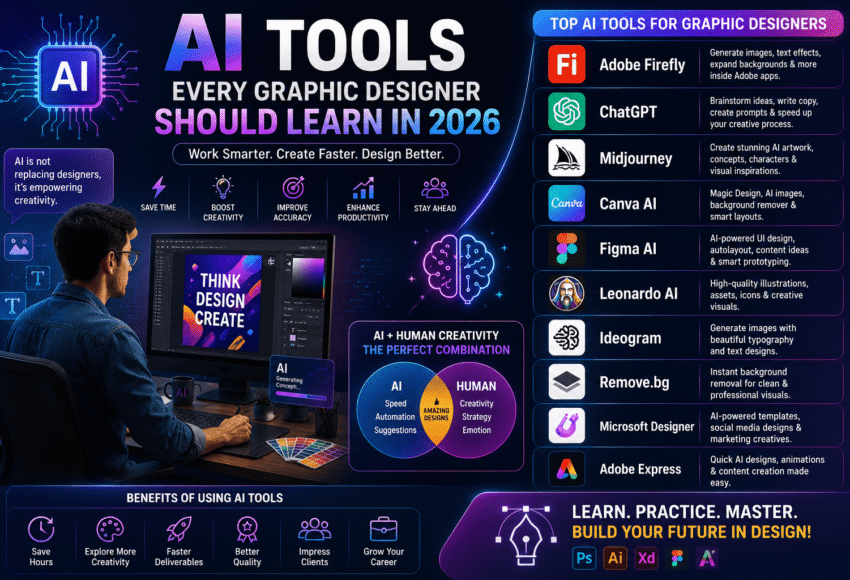
AI Tools Every Graphic Designer Should Learn in 2026
Artificial Intelligence (AI) is transforming the graphic design industry by making creative workflows faster, smarter, and more efficient. From generating design concepts and editing images to creating brand assets and marketing creatives, AI-powered tools are helping designers save time while unlocking new creative possibilities.
However, AI is not replacing graphic designers—it is enhancing their capabilities. Designers who understand both traditional design principles and AI-powered workflows are becoming more valuable in agencies, startups, marketing companies, and creative studios.
In this complete guide, you’ll discover the best AI tools every Graphic Designer should learn in 2026, their features, career benefits, and how they can help you stay competitive in the evolving creative industry.
Why Graphic Designers Should Learn AI Tools
AI is changing the way design projects are planned and delivered. Modern businesses expect faster turnaround times, personalized visuals, and creative consistency across multiple platforms.
Learning AI tools helps designers:
- Generate Ideas Faster
- Automate Repetitive Tasks
- Improve Design Quality
- Increase Productivity
- Create Marketing Assets Quickly
- Enhance Photo Editing
- Produce Multiple Design Variations
- Build Better Client Presentations
- Improve Collaboration
- Stay Competitive in the Job Market
Designers who embrace AI can focus more on strategy, storytelling, and creative decision-making.
Top AI Tools Every Graphic Designer Should Learn in 2026
1. Adobe Firefly
Adobe Firefly is one of the leading AI-powered creative tools integrated into Adobe Creative Cloud.
Best For
- AI Image Generation
- Generative Fill
- Background Extension
- Text Effects
- Object Replacement
- Colour Variations
Why Learn It?
If you already use Photoshop or Illustrator, Firefly integrates seamlessly into your workflow and speeds up image editing and concept creation.
2. ChatGPT
ChatGPT is more than a writing assistant—it helps designers brainstorm ideas, create design briefs, generate creative concepts, write marketing copy, and refine client communication.
Best For
- Creative Brainstorming
- Design Concepts
- Logo Naming Ideas
- Social Media Captions
- Brand Messaging
- UI Content
- Presentation Outlines
Why Learn It?
It saves time during the planning stage and helps overcome creative blocks.
3. Midjourney
Midjourney generates high-quality AI artwork and concept visuals from text prompts.
Best For
- Concept Art
- Branding Ideas
- Poster Inspiration
- Character Design
- Packaging Concepts
- Mood Boards
Why Learn It?
It enables rapid visual exploration before starting detailed design work.
4. Canva AI
Canva AI combines design templates with AI-powered features, making it useful for creating marketing materials quickly.
Best For
- Social Media Graphics
- Presentations
- Marketing Creatives
- Business Posters
- Flyers
- Advertisements
AI Features
- Magic Design
- Magic Write
- Background Remover
- AI Image Generation
- Resize Tool
5. Figma AI
Figma AI enhances the UI/UX design process by assisting with layout generation, content suggestions, and workflow optimisation.
Best For
- Website UI
- Mobile Apps
- Wireframes
- Prototypes
- Design Systems
- Team Collaboration
Figma AI is particularly valuable for product and interface designers.
6. Leonardo AI
Leonardo AI is widely used for creating detailed illustrations, concept art, and game assets.
Best For
- Illustration
- Gaming Assets
- Character Design
- Product Concepts
- Fantasy Art
- Creative Visualisation
It is especially useful for designers working in gaming, entertainment, and digital art.
7. Ideogram
Ideogram specialises in generating AI images with high-quality typography.
Best For
- Poster Design
- Typography Concepts
- Advertising
- Logo Inspiration
- Social Media Graphics
- Quote Designs
It is an excellent choice for designers who frequently work with text-heavy visuals.
8. Microsoft Designer
Microsoft Designer simplifies the creation of professional marketing materials using AI.
Best For
- Social Media Posts
- Invitations
- Promotional Graphics
- Marketing Campaigns
- Digital Ads
Its intuitive interface makes it suitable for beginners and marketing professionals.
9. Remove.bg
Remove.bg automates background removal in seconds.
Best For
- Product Photography
- E-commerce Images
- Portrait Editing
- Marketing Creatives
This tool significantly reduces time spent on manual masking.
10. Adobe Express AI
Adobe Express AI enables designers to quickly create social media content, marketing materials, and promotional graphics.
Features
- AI Templates
- Text Effects
- Image Generation
- Background Removal
- Animation
- Content Scheduling
It is ideal for businesses that require consistent digital content.
Essential Skills to Combine with AI Tools
Learning AI tools alone is not enough. Employers continue to value designers with strong creative fundamentals.
Focus on developing:
- Typography
- Colour Theory
- Layout Design
- Branding
- Visual Hierarchy
- Composition
- User Psychology
- Design Thinking
- Creative Storytelling
- Communication Skills
- Portfolio Development
AI enhances these skills—it does not replace them.
AI Tools Comparison
| AI Tool | Best Use | Suitable For |
|---|---|---|
| Adobe Firefly | AI Image Editing | Graphic Designers |
| ChatGPT | Creative Ideas & Copy | All Designers |
| Midjourney | Concept Art | Creative Professionals |
| Canva AI | Marketing Design | Beginners & Businesses |
| Figma AI | UI/UX Design | Product Designers |
| Leonardo AI | Illustration | Artists & Game Designers |
| Ideogram | Typography Images | Branding Designers |
| Microsoft Designer | Marketing Graphics | Small Businesses |
| Remove.bg | Background Removal | E-commerce Designers |
| Adobe Express AI | Social Media Design | Digital Marketers |
Career Opportunities After Learning AI Design Tools
Designers with AI skills can pursue careers such as:
- Graphic Designer
- AI-Assisted Graphic Designer
- Visual Designer
- Creative Designer
- Brand Designer
- Digital Marketing Designer
- UI Designer
- Social Media Designer
- Creative AI Specialist
- Marketing Designer
Industries hiring AI-enabled designers include:
- Digital Marketing Agencies
- Advertising Companies
- IT Firms
- E-commerce Businesses
- Media Organisations
- Startups
- Corporate Marketing Teams
- Educational Institutions
Salary Expectations
Salary depends on creativity, software expertise, portfolio, industry, and experience.
Graphic Designer
Freshers:
- ₹2.5–5 LPA
Experienced Professionals:
- ₹6–12+ LPA
AI-Enabled Graphic Designer
Freshers:
- ₹4–7 LPA
Experienced Professionals:
- ₹8–18+ LPA
Professionals who combine AI expertise with branding, UI design, and digital marketing often command higher salaries.
Future Scope of AI in Graphic Design
The future of AI-powered design includes:
- Personalised Marketing
- AI-Assisted Branding
- Interactive Content
- Motion Graphics
- AR & VR Experiences
- Automated Design Systems
- Intelligent Content Creation
- Faster Client Deliverables
- AI-Powered Collaboration
- Creative Workflow Automation
Designers who continuously learn new technologies will be well-positioned for long-term success.
How to Become an AI-Ready Graphic Designer
Follow these steps:
- Learn Graphic Design Fundamentals.
- Master Adobe Photoshop and Illustrator.
- Learn Figma for digital design.
- Explore AI tools such as Firefly, ChatGPT, and Midjourney.
- Build a professional portfolio.
- Complete live design projects.
- Learn branding and digital marketing basics.
- Stay updated with AI trends.
- Practice prompt writing for AI tools.
- Keep improving through real-world experience.
Why Choose a Professional Graphic Design Institute?
A quality Graphic Design course should include:
- Industry-Relevant Curriculum
- Adobe Creative Suite Training
- AI Design Tools
- Live Client Projects
- Portfolio Development
- Expert Mentorship
- Internship Opportunities
- Placement Assistance
- Career Guidance
- Updated AI Workflow Training
Hands-on learning ensures students are prepared for modern creative careers.
Frequently Asked Questions (FAQs)
1. Which AI tool is best for Graphic Designers?
Adobe Firefly, ChatGPT, Midjourney, Canva AI, and Figma AI are among the most widely used AI tools, each serving different creative needs such as image generation, brainstorming, UI design, and marketing content.
2. Will AI replace Graphic Designers?
No. AI automates repetitive tasks and speeds up workflows, but creativity, branding strategy, communication, and problem-solving remain human strengths.
3. Is ChatGPT useful for Graphic Designers?
Yes. ChatGPT can assist with brainstorming, design briefs, content writing, client communication, presentation preparation, and creative ideation.
4. Should beginners learn AI before Graphic Design?
It is recommended to first learn graphic design fundamentals such as typography, colour theory, layout, and branding. AI tools become far more effective when used by designers with a solid creative foundation.
5. Which AI tool is best for logo design?
AI can generate logo concepts and inspiration using tools like Adobe Firefly or Midjourney, but professional logo design still requires strategic thinking, originality, and refinement by a designer.
6. Is learning AI important for Graphic Designers in 2026?
Yes. AI skills are increasingly valuable because they improve productivity and help designers adapt to modern creative workflows.
7. Can I freelance after learning AI design tools?
Yes. Freelancers who combine AI tools with design expertise can deliver projects more efficiently and offer a wider range of creative services.
8. Which industries hire AI-enabled Graphic Designers?
Advertising, digital marketing, IT, e-commerce, media, education, startups, and corporate organisations increasingly seek designers familiar with AI-assisted workflows.
9. Do AI tools require coding?
Most popular AI design tools do not require coding. They are designed with user-friendly interfaces suitable for designers, marketers, and other creative professionals.
10. Which Graphic Design course is best after the 12th?
A modern Graphic Design course that covers Adobe Creative Suite, Figma, branding, portfolio development, and AI-powered design tools provides a strong foundation for a creative career.
Conclusion
Artificial Intelligence is reshaping graphic design by making creative workflows faster, more efficient, and more collaborative. Rather than replacing designers, AI is becoming a powerful creative assistant that helps generate ideas, automate repetitive tasks, and improve productivity.
The designers who will succeed in 2026 and beyond are those who combine strong design fundamentals, creative thinking, and AI-powered tools. By mastering platforms like Adobe Firefly, ChatGPT, Midjourney, Canva AI, and Figma AI, while continuing to develop branding, typography, storytelling, and problem-solving skills, you can build a future-ready career in graphic design and digital creativity.


Leave a Comment