
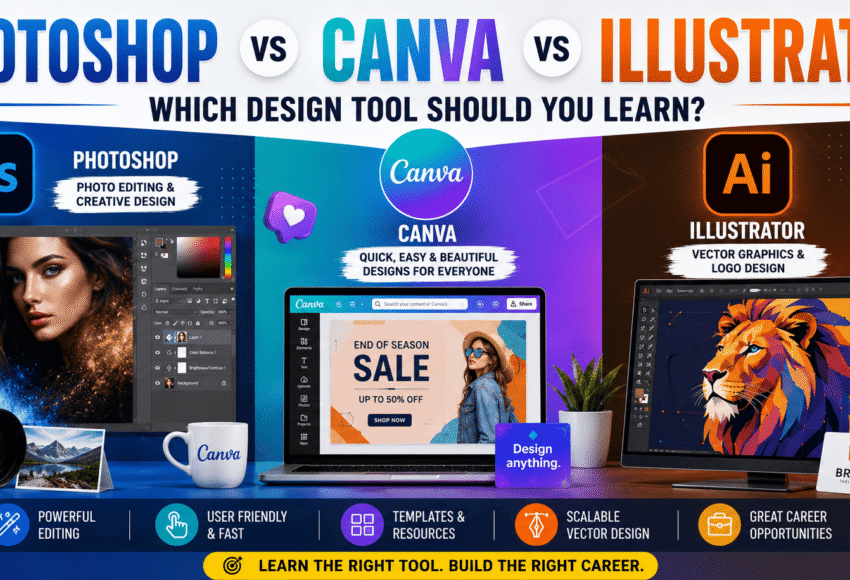
Photoshop vs Canva vs Illustrator: Which Design Tool Should You Learn in 2026?
Summary
Choosing the right design software can shape your creative career. Adobe Photoshop, Canva, and Adobe Illustrator are three of the most popular design tools, but each serves a different purpose.
If you’re a beginner, student, freelancer, content creator, or aspiring graphic designer, this guide compares all three platforms based on ease of learning, features, career opportunities, pricing, AI capabilities, and future demand. By the end, you’ll know which tool is the best fit for your goals in 2026.
Introduction
The demand for visual content is higher than ever. Businesses need eye-catching graphics for websites, social media, advertising, e-commerce, branding, and digital marketing.
Whether you’re designing Instagram posts, editing photos, creating logos, or building brand identities, selecting the right design tool is essential.
The three most popular choices are:
- Adobe Photoshop
- Canva
- Adobe Illustrator
Although they may appear similar, each has unique strengths and ideal use cases.
Quick Comparison
| Feature | Adobe Photoshop | Canva | Adobe Illustrator |
|---|---|---|---|
| Best For | Photo Editing & Graphics | Quick Content Creation | Logo & Vector Design |
| Skill Level | Intermediate | Beginner | Intermediate to Advanced |
| Learning Curve | Medium | Very Easy | Moderate |
| AI Features | Excellent | Excellent | Excellent |
| Professional Use | ★★★★★ | ★★★☆☆ | ★★★★★ |
| Freelancing Opportunities | High | Medium | High |
| Branding Projects | Excellent | Good | Excellent |
| Print Design | Excellent | Good | Excellent |
| Social Media Design | Excellent | Excellent | Good |
| Logo Design | Basic | Limited | Best |
Adobe Photoshop
What is Photoshop?
Adobe Photoshop is the world’s leading raster graphics and photo editing software.
It is widely used by:
- Graphic Designers
- Photographers
- Digital Artists
- Marketing Agencies
- Content Creators
- E-commerce Companies
Best Uses of Photoshop
- Photo Editing
- Photo Retouching
- Social Media Graphics
- Website Banners
- Advertisement Design
- Poster Design
- Digital Painting
- Product Image Editing
- YouTube Thumbnails
- Creative Photo Manipulation
Advantages
- Industry-standard software
- Powerful editing capabilities
- Advanced AI tools
- Extensive creative control
- Large plugin ecosystem
- Strong job market demand
Limitations
- Requires practice
- Subscription-based pricing
- Not ideal for vector logo creation
Canva
What is Canva?
Canva is a browser-based graphic design platform built for speed and simplicity.
It allows users to create professional-looking designs using drag-and-drop templates.
Best Uses of Canva
- Instagram Posts
- Facebook Ads
- Presentations
- Posters
- Flyers
- Invitations
- Business Cards
- Resumes
- Infographics
- YouTube Thumbnails
Advantages
- Extremely beginner-friendly
- Thousands of ready-made templates
- Fast design workflow
- Team collaboration
- Cloud-based access
- Built-in AI features
Limitations
- Limited advanced editing
- Less creative freedom
- Not suitable for high-end professional design work
Adobe Illustrator
What is Illustrator?
Adobe Illustrator is the industry standard for vector graphics.
Unlike Photoshop, Illustrator creates scalable artwork that never loses quality.
Best Uses of Illustrator
- Logo Design
- Brand Identity
- Icons
- Packaging Design
- Typography
- Infographics
- Illustrations
- Vector Art
- Product Labels
- Print Graphics
Advantages
- Infinite scalability
- Precise vector editing
- Professional branding tools
- Perfect for print production
- Industry standard for logo design
Limitations
- Steeper learning curve
- Less suitable for detailed photo editing
Which Tool is Easier to Learn?
Canva
Ideal for absolute beginners.
You can create attractive designs within a few hours.
Photoshop
Requires consistent practice, but offers much greater creative flexibility.
Most learners become comfortable with the basics in a few weeks.
Illustrator
Learning vector drawing and advanced design concepts takes more time, but the long-term benefits are significant for branding and illustration work.
AI Features Comparison
Photoshop
Offers advanced AI tools such as:
- Generative Fill
- Object Removal
- Background Replacement
- AI Expand
- Neural Filters
Canva
Includes AI-powered tools for:
- Magic Design
- Magic Resize
- Background Remover
- AI Writing
- Text-to-Image
- Presentation Generation
Illustrator
Provides AI-assisted capabilities including:
- Generative Recolor
- Text-to-Vector Graphics
- AI Pattern Generation
- Smart Object Editing
Career Opportunities
After Learning Photoshop
- Graphic Designer
- Photo Editor
- Social Media Designer
- Digital Artist
- Advertising Designer
- UI Designer
- Marketing Designer
After Learning Canva
- Social Media Manager
- Content Creator
- Marketing Executive
- Virtual Assistant
- Small Business Designer
- Presentation Designer
After Learning Illustrator
- Logo Designer
- Brand Identity Designer
- Packaging Designer
- Vector Illustrator
- Print Designer
- Creative Director
Which Tool Do Companies Prefer?
Large agencies and professional design studios generally prefer:
- Adobe Photoshop
- Adobe Illustrator
Startups, educational institutions, freelancers, and small businesses often use Canva for quick content production alongside Adobe applications.
Many organizations combine all three tools depending on project requirements.
Which Tool Should Students Learn?
Choose Canva if:
- You are a complete beginner.
- You need fast designs for school, college, or social media.
- You prefer templates over custom design.
Choose Photoshop if:
- You want a career in graphic design.
- You enjoy editing photos.
- You plan to freelance.
- You want advanced creative skills.
Choose Illustrator if:
- You want to specialize in logos and branding.
- You enjoy drawing and vector graphics.
- You aim to become a professional brand designer.
Best Learning Path
For most aspiring designers, this progression works well:
- Start with Canva to understand basic design principles.
- Learn Photoshop for image editing and professional graphic design.
- Master Illustrator for vector graphics, logos, and branding.
This combination provides a versatile skill set for modern creative careers.
Future Scope (2026 & Beyond)
As AI accelerates design workflows, professionals who understand both creativity and technology will have a competitive advantage.
Learning Photoshop, Canva, and Illustrator together can prepare you for opportunities in:
- Graphic Design
- Digital Marketing
- Branding
- Advertising
- UI/UX Design
- Content Creation
- E-commerce
- Freelancing
- Print Media
- Remote International Projects
Frequently Asked Questions (FAQs)
1. Which is better: Photoshop, Canva, or Illustrator?
It depends on your goals. Photoshop excels at photo editing, Canva is ideal for quick designs, and Illustrator is the best choice for vector graphics and logo design.
2. Is Canva enough for a graphic design career?
Canva is excellent for basic content creation, but professional graphic designers typically benefit from learning Photoshop and Illustrator as well.
3. Should beginners learn Photoshop first?
If you’re interested in a long-term design career, Photoshop is a strong starting point. If you want quick results with minimal learning, Canva is an easier introduction.
4. Can I get a job after learning Photoshop and Illustrator?
Yes. Together, these tools prepare you for many creative roles, including graphic designer, branding specialist, marketing designer, and freelance creative professional.
5. Which software has the best future?
All three tools continue to evolve with AI capabilities. However, Photoshop and Illustrator remain industry standards for professional creative work, while Canva continues to dominate quick, collaborative content creation.
Conclusion
There is no single “best” design tool—only the best tool for your goals.
If you want to create designs quickly with minimal effort, Canva is an excellent choice. If your ambition is to build a professional career in graphic design, advertising, photo editing, or digital media, Photoshop is essential. For logo design, branding, and scalable vector artwork, Illustrator remains unmatched.
For the strongest long-term career prospects, learning all three tools in sequence will make you a more versatile, adaptable, and future-ready designer in 2026 and beyond.
Leave a Comment