
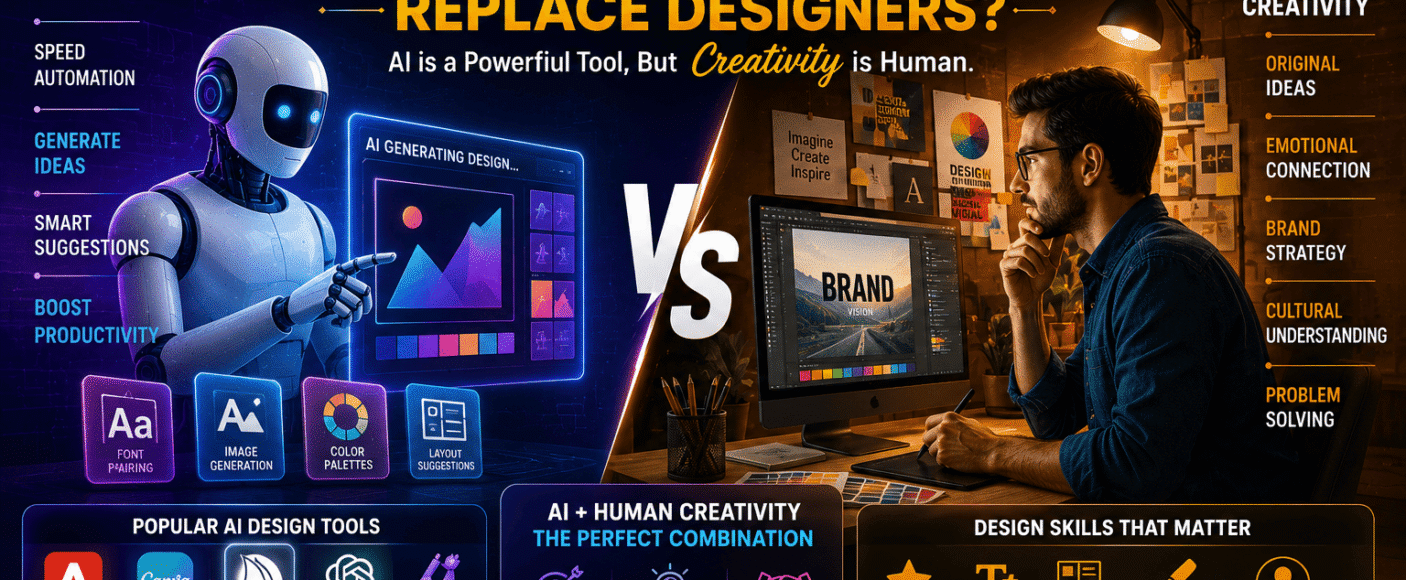
Graphic Design + AI: Can Artificial Intelligence Replace Designers?
Artificial Intelligence (AI) is revolutionizing the creative industry. Today, AI-powered design tools can generate logos, social media posts, illustrations, presentations, marketing creatives, and even complete brand concepts within minutes. This rapid advancement has sparked an important question among students, businesses, and creative professionals: Can AI replace graphic designers?
The answer is more nuanced than a simple yes or no. AI is transforming how designers work, but it is not eliminating the need for human creativity, strategy, and problem-solving.
In this guide, we’ll compare Graphic Design and AI, explain how AI is changing the design industry, explore career opportunities, salaries, essential skills, and discuss why designers who embrace AI are likely to thrive in the future.
What is AI in Graphic Design?
AI in Graphic Design refers to the use of artificial intelligence to assist with creating, editing, enhancing, and optimizing visual content. AI tools can automate repetitive design tasks, generate ideas, suggest layouts, remove backgrounds, create images from text, and accelerate creative workflows.
AI is commonly used for:
- Logo Concepts
- Social Media Creatives
- Marketing Banners
- Image Generation
- Background Removal
- Photo Enhancement
- Presentation Design
- Mockups
- Color Palette Suggestions
- Typography Recommendations
- Brand Asset Generation
- Creative Brainstorming
Rather than replacing designers, AI often acts as a creative assistant.
What Does a Graphic Designer Do?
Graphic Designers solve communication problems through visual design. They combine creativity, branding, psychology, typography, and design principles to create visuals that connect with audiences and support business goals.
Graphic designers create:
- Brand Identity
- Logos
- Packaging
- Website Graphics
- Social Media Posts
- Print Advertisements
- Brochures
- Infographics
- Business Presentations
- Product Packaging
- Digital Marketing Creatives
Their work goes beyond aesthetics—it involves understanding target audiences, business objectives, and effective visual communication.
AI vs Human Graphic Designer: Quick Comparison
| Feature | AI Design Tools | Human Graphic Designer |
|---|---|---|
| Speed | Very Fast | Moderate |
| Creativity | Pattern-Based Generation | Original & Strategic Thinking |
| Business Understanding | Limited | Strong |
| Brand Strategy | Limited | Excellent |
| Emotional Storytelling | Limited | Strong |
| Client Communication | Not Applicable | Essential |
| Custom Design | Moderate | Highly Personalized |
| Problem Solving | Task-Specific | Comprehensive |
| Innovation | Assisted | Human-Led |
How AI is Transforming Graphic Design
AI is helping designers work smarter by automating repetitive tasks while allowing them to focus on strategy and creativity.
AI can assist with:
- Generating Design Concepts
- Creating Marketing Creatives
- Removing Backgrounds
- Enhancing Images
- Generating Icons and Illustrations
- Auto-Resizing Designs
- Color Matching
- Layout Suggestions
- Typography Pairing
- Content Repurposing
- Mockup Creation
These capabilities improve productivity and reduce turnaround times.
What AI Cannot Replace
Despite rapid advancements, AI still has limitations.
Human designers remain essential for:
- Brand Strategy
- Creative Direction
- Emotional Storytelling
- Cultural Context
- Client Collaboration
- Design Thinking
- User-Centered Design
- Ethical Decision-Making
- Original Campaign Development
- Complex Visual Problem Solving
Successful design requires understanding people, businesses, and context—areas where human expertise continues to play a critical role.
Popular AI Tools for Graphic Designers
Modern designers often use AI-enhanced tools such as:
- Adobe Firefly
- Canva AI
- Midjourney
- DALL·E
- Microsoft Designer
- Adobe Express
- Figma AI
- Leonardo AI
- Ideogram
- ChatGPT (for creative ideation and content support)
These tools help streamline ideation and production while leaving strategic decisions to designers.
Essential Skills for Future Graphic Designers
To stay competitive, graphic designers should develop:
- Typography
- Color Theory
- Layout Design
- Branding
- Visual Storytelling
- User Psychology
- Design Thinking
- Adobe Photoshop
- Adobe Illustrator
- Figma
- AI Design Tools
- Creative Strategy
- Communication Skills
- Portfolio Development
Combining design fundamentals with AI proficiency creates a strong competitive advantage.
Career Opportunities in AI-Powered Graphic Design
Professionals can pursue roles such as:
- Graphic Designer
- Brand Designer
- AI-Assisted Designer
- Visual Designer
- Marketing Designer
- Social Media Designer
- Creative Designer
- UI Designer
- Digital Content Creator
- Creative AI Specialist
Industries hiring AI-savvy designers include:
- Digital Marketing Agencies
- Advertising Companies
- Startups
- IT Firms
- E-commerce Brands
- Media Organizations
- Corporate Businesses
- Educational Institutions
Salary Comparison
Salary depends on skills, experience, specialization, portfolio, and industry.
Graphic Designer Salary
Freshers:
- ₹2.5–5 LPA
Experienced Professionals:
- ₹6–12+ LPA
Specialists in branding, UI design, packaging, and digital marketing often earn higher salaries.
AI-Enabled Graphic Designer Salary
Freshers:
- ₹4–7 LPA
Experienced Professionals:
- ₹8–18+ LPA
Designers who combine creative expertise with AI workflows, branding, and digital strategy are increasingly attractive to employers.
Future Scope of Graphic Design with AI
The future of Graphic Design is expected to evolve through:
- AI-Assisted Creative Workflows
- Personalized Marketing
- Faster Content Production
- Interactive Digital Experiences
- Motion Graphics
- Brand Experience Design
- AR & VR Design
- Cross-Platform Content Creation
- Data-Driven Design Decisions
AI is becoming a productivity tool rather than a replacement for professional designers.
Will AI Replace Graphic Designers?
The more practical question is not whether AI will replace designers, but how designers will adapt to AI.
AI can automate repetitive production tasks, but it does not independently understand business strategy, audience emotions, cultural nuances, or long-term brand identity. Designers who learn to integrate AI into their workflow can produce high-quality work more efficiently and expand the services they offer.
In many workplaces, AI is changing the nature of design work—not eliminating the need for skilled designers.
How to Build a Future-Proof Design Career
To remain competitive, focus on:
- Mastering Design Fundamentals
- Learning AI Design Tools
- Building a Strong Portfolio
- Understanding Branding
- Improving Communication Skills
- Learning UX Basics
- Developing Creative Strategy
- Practicing Real-World Projects
- Keeping Up with Industry Trends
Continuous learning is one of the best ways to stay relevant in a rapidly changing creative industry.
Why Choose a Professional Graphic Design Institute?
A high-quality Graphic Design course should include:
- Industry-Relevant Curriculum
- Adobe Creative Suite Training
- AI Design Tools
- Live Projects
- Portfolio Development
- Branding Assignments
- Expert Mentorship
- Internship Opportunities
- Placement Assistance
- Career Guidance
Practical experience helps students transition confidently into professional design roles.
Frequently Asked Questions (FAQs)
1. Can AI replace Graphic Designers?
AI can automate many repetitive design tasks, but it cannot fully replace human creativity, strategic thinking, client collaboration, and original problem-solving. Designers who use AI effectively are likely to remain in demand.
2. Is Graphic Design still a good career in 2026?
Yes. Businesses continue to require branding, digital marketing assets, user interfaces, advertising creatives, and visual communication. AI is changing workflows, but the demand for skilled designers remains strong.
3. Which AI tools should Graphic Designers learn?
Popular tools include Adobe Firefly, Canva AI, Midjourney, DALL·E, Figma AI, Leonardo AI, Microsoft Designer, and ChatGPT for ideation and content support.
4. Should beginners learn Graphic Design before AI?
Yes. A strong understanding of typography, color, composition, branding, and design principles makes it easier to use AI effectively and evaluate its outputs.
5. Does AI make Graphic Designers more productive?
Yes. AI can speed up brainstorming, image editing, layout generation, and repetitive production tasks, allowing designers to focus more on creative strategy and client needs.
6. Can Graphic Designers freelance using AI?
Absolutely. AI-assisted workflows can help freelancers deliver projects faster while maintaining quality, provided they continue to apply their creative judgment.
7. What industries hire AI-enabled Graphic Designers?
Digital marketing, advertising, IT, e-commerce, media, education, startups, and corporate organizations increasingly value designers who understand AI-assisted workflows.
8. Do Graphic Designers need coding skills?
Not necessarily. Coding is not required for most graphic design roles, although basic web or UI knowledge can broaden career opportunities.
9. Is learning AI enough to become a Graphic Designer?
No. AI tools are most effective when combined with design fundamentals, branding knowledge, creativity, communication skills, and a strong portfolio.
10. What is the best way to prepare for the future of Graphic Design?
Master design principles, build practical experience, learn AI-powered tools, stay updated with industry trends, and continuously refine your portfolio.
Conclusion
Artificial Intelligence is transforming the way graphic designers work, but it is not replacing the need for human creativity. AI excels at automating repetitive tasks, generating ideas, and improving efficiency, while designers contribute strategic thinking, emotional storytelling, brand understanding, and creative direction.
The future belongs to professionals who embrace both worlds. By combining strong design fundamentals with AI-powered tools, graphic designers can enhance productivity, expand career opportunities, and deliver greater value to clients and employers. In 2026 and beyond, the most successful designers are likely to be those who view AI as a creative partner rather than a competitor.


Leave a Comment