
Illustrator vs Photoshop: Which Software is Best for Graphic Designers? (Complete 2026 Comparison Guide)
Summary
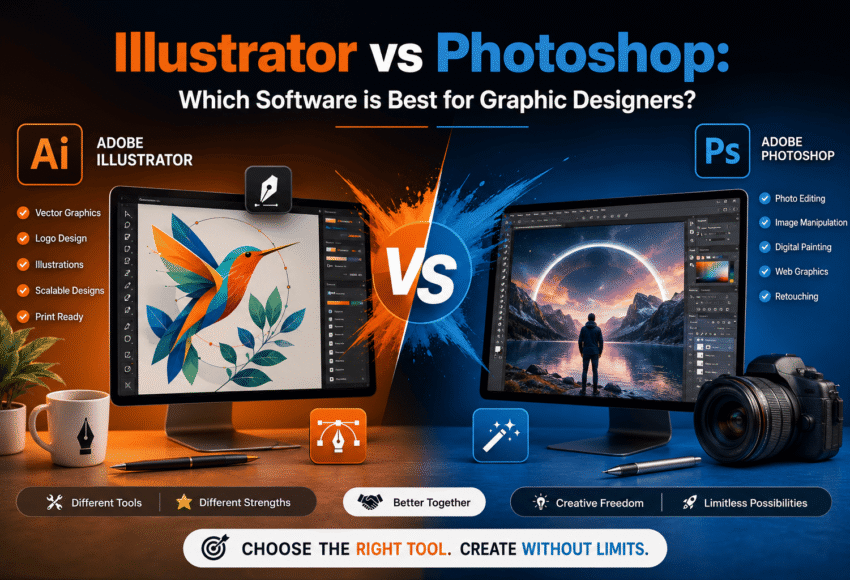
Choosing between Adobe Illustrator and Adobe Photoshop is one of the biggest decisions for aspiring graphic designers. While both are industry-leading design applications, they serve different purposes. Illustrator excels at creating vector graphics like logos, icons, branding, and illustrations, whereas Photoshop is the preferred tool for photo editing, digital painting, image manipulation, and web graphics. This comprehensive guide compares both software based on features, use cases, career opportunities, learning difficulty, pricing, and industry demand to help you decide which software is best for your design career in 2026.
Illustrator vs Photoshop: Which Software is Best for Graphic Designers?
Graphic design has become one of the fastest-growing creative professions, with businesses relying heavily on visual content for branding, marketing, websites, social media, advertising, and digital products.
Two of the most popular tools in the Adobe Creative Cloud ecosystem are Adobe Illustrator and Adobe Photoshop. Although both are essential for designers, they are built for different tasks and workflows.
Understanding their strengths will help you choose the right software based on your career goals.
What is Adobe Illustrator?
Adobe Illustrator is a professional vector graphics software used to create artwork made from mathematical paths rather than pixels. This allows graphics to be resized infinitely without losing quality.
Illustrator is widely used for:
- Logo Design
- Brand Identity
- Vector Illustration
- Icons
- Typography
- Infographics
- Packaging Design
- Print Design
- Technical Drawings
It is considered the industry standard for vector-based design.
What is Adobe Photoshop?
Adobe Photoshop is the world’s leading raster graphics editor that works with pixels instead of vectors.
Photoshop is primarily used for:
- Photo Editing
- Image Retouching
- Photo Manipulation
- Digital Painting
- Social Media Graphics
- Website Graphics
- Banner Design
- Product Image Editing
- AI Image Enhancement
Photoshop is the first choice for photographers, digital artists, marketers, and content creators.
Illustrator vs Photoshop: Quick Comparison
| Feature | Adobe Illustrator | Adobe Photoshop |
|---|---|---|
| Graphics Type | Vector | Raster (Pixel-Based) |
| Best For | Logos, Icons, Branding | Photo Editing, Digital Art |
| Scalability | Unlimited | Limited by Resolution |
| Image Editing | Basic | Excellent |
| Logo Design | Excellent | Good |
| Illustration | Excellent | Very Good |
| Photo Retouching | Limited | Excellent |
| Print Design | Excellent | Good |
| Digital Painting | Good | Excellent |
| Learning Difficulty | Moderate | Moderate to Advanced |
Understanding Vector vs Raster Graphics
One of the biggest differences between Illustrator and Photoshop is how they create images.
Vector Graphics (Illustrator)
Vector graphics use mathematical paths.
Advantages include:
- Infinite scalability
- Sharp edges
- Small file sizes
- Perfect for branding
- Ideal for print
Common examples include:
- Company logos
- Icons
- Business cards
- Packaging
- Infographics
Raster Graphics (Photoshop)
Raster graphics consist of pixels.
Advantages include:
- Rich detail
- Realistic textures
- Advanced image editing
- Professional photography editing
Common examples include:
- Photographs
- Digital paintings
- Website banners
- Product images
- Social media creatives
When Should You Use Adobe Illustrator?
Illustrator is the better choice if you want to create:
- Logos
- Brand identity
- Icons
- Character illustrations
- Product packaging
- Posters
- Business stationery
- Technical illustrations
- Typography artwork
- Infographics
Since vector graphics never lose quality, Illustrator is the preferred software for professional branding projects.
When Should You Use Photoshop?
Photoshop is ideal when working with:
- Portrait editing
- Fashion photography
- Product photography
- Background removal
- Image manipulation
- Social media ads
- Website banners
- Digital painting
- Photo restoration
- AI-generated image editing
Photoshop offers unmatched tools for image enhancement and creative photo editing.
Which Software Do Graphic Designers Use?
Professional graphic designers often use both Illustrator and Photoshop together because each complements the other.
A typical workflow might include:
- Designing a logo in Illustrator
- Editing product photos in Photoshop
- Creating social media graphics using assets from both
- Preparing marketing materials with vector and raster elements
Learning both applications significantly improves versatility and employability.
Career Opportunities After Learning Illustrator
Professionals skilled in Illustrator can pursue careers such as:
- Graphic Designer
- Logo Designer
- Brand Identity Designer
- Packaging Designer
- Vector Illustrator
- Infographic Designer
- Print Designer
- Technical Illustrator
- Creative Consultant
Career Opportunities After Learning Photoshop
Photoshop expertise can lead to roles including:
- Photo Editor
- Digital Artist
- Image Retoucher
- Social Media Designer
- Marketing Designer
- Web Graphic Designer
- Product Image Specialist
- Advertising Designer
- Creative Content Designer
Which Software Is Easier to Learn?
Adobe Illustrator
Beginners generally find Illustrator easier when focusing on:
- Shapes
- Paths
- Pen Tool
- Logo Design
- Icons
The interface is structured around vector creation, making it straightforward for design-focused projects.
Adobe Photoshop
Photoshop offers more tools and features, which can make the initial learning curve steeper. However, it provides greater flexibility for image editing and creative effects.
Which Software Has Better Job Opportunities?
Both applications are highly valued, but opportunities differ by specialization.
Illustrator is preferred in:
- Branding Agencies
- Printing Companies
- Packaging Design
- Publishing
- Advertising Agencies
Photoshop is preferred in:
- Photography Studios
- Digital Marketing Agencies
- eCommerce Companies
- Social Media Marketing
- Advertising
- Web Design
Professionals proficient in both tools often have access to a broader range of career opportunities.
Salary Comparison in India (2026)
| Job Role | Average Salary |
|---|---|
| Graphic Designer | ₹3–6 LPA |
| Illustrator Specialist | ₹4–8 LPA |
| Brand Identity Designer | ₹6–12 LPA |
| Photoshop Editor | ₹3–7 LPA |
| Senior Designer | ₹8–18 LPA |
| Freelance Designer | ₹30,000–₹2,50,000+ per month (project-dependent) |
Should You Learn Illustrator or Photoshop First?
The answer depends on your career goals.
Learn Illustrator First If You Want To:
- Become a Logo Designer
- Create Brand Identities
- Design Icons
- Work in Print Design
- Build Vector Illustrations
Learn Photoshop First If You Want To:
- Edit Photos
- Become a Digital Artist
- Create Social Media Graphics
- Work in Advertising
- Design Website Graphics
Best Recommendation
For long-term career growth, learning both applications provides the strongest foundation. Start with the one that aligns most closely with your interests, then expand your skill set to include the other.
Future Scope of Illustrator and Photoshop
As AI-powered design tools become more common, Illustrator and Photoshop continue to evolve with advanced features that enhance productivity rather than replace creative professionals.
Demand is increasing across industries such as:
- Digital Marketing
- Branding
- UI/UX
- eCommerce
- Publishing
- Animation
- Gaming
- Packaging
- Advertising
- Online Education
Professionals who combine creativity with expertise in both applications will remain highly competitive in the job market.
Frequently Asked Questions (FAQs)
1. Which is better for logo design: Illustrator or Photoshop?
Adobe Illustrator is the preferred choice because it creates vector graphics that can be resized without losing quality.
2. Can I become a graphic designer using only Photoshop?
Yes, but learning Illustrator alongside Photoshop will broaden your capabilities and improve your career prospects.
3. Which software is better for beginners?
If your goal is branding and illustration, start with Illustrator. If you’re interested in photo editing and digital art, Photoshop is a better starting point
4. Do professional graphic designers use both Illustrator and Photoshop?
Yes. Most professional designers use both tools depending on the project requirements.
5. Is Adobe Illustrator still worth learning in 2026?
Absolutely. Illustrator remains the industry standard for vector graphics, branding, packaging, logo design, and print-ready artwork
Conclusion
Adobe Illustrator and Adobe Photoshop are not competing tools—they are complementary applications that serve different creative purposes. Illustrator is the best choice for vector graphics, branding, logo design, and scalable artwork, while Photoshop excels at photo editing, image manipulation, and digital artwork.
If your goal is to build a successful career in graphic design, mastering both applications will give you the flexibility to work across industries, take on diverse freelance projects, and stay competitive in the evolving design landscape. Investing time in learning Illustrator and Photoshop together is one of the smartest decisions for aspiring graphic designers in 2026 and beyond
Leave a Comment